Is your backup power actually working? A UPS review checklist for businesses

Most small and mid-size businesses have at least one UPS (uninterruptible power supply) protecting their servers and network gear. Fewer have a clear picture of whether those units are still adequately sized, whether the batteries are still functional, or whether the equipment they’re protecting has grown beyond the unit’s rated capacity.

The business cost of overheating hardware — and 5 strategies to prevent it

When business computers and servers run too hot, the consequences range from reduced performance to premature hardware failure and, in serious cases, fire risk. The good news is that most overheating problems are preventable with a combination of smart placement, regular maintenance, appropriate cooling equipment, and monitoring.

What to look for when buying an office projector

Buying a projector for an office conference room is surprisingly easy to get wrong. Insufficient brightness, a missing port, or an unsuitable throw distance can turn what should be a productivity tool into a constant source of frustration. Here’s what to actually pay attention to before you commit.

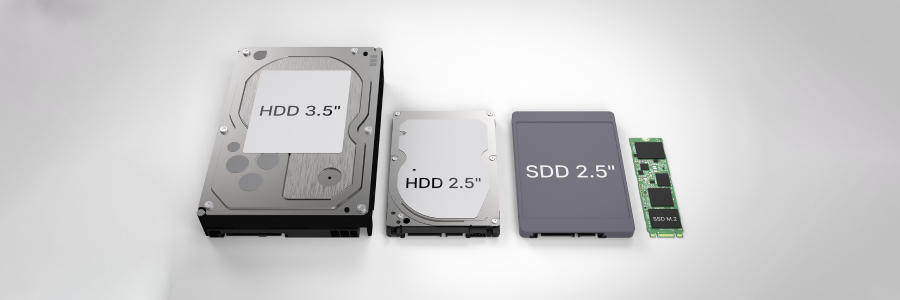
Hard drives vs. solid-state drives: What every business owner should know

Corporate hardware decisions require balancing daily operating speeds against long-term data preservation requirements. Evaluating the fundamental mechanics of your storage hardware allows you to maximize office productivity while controlling budget expenses.

Strategic steps for reducing corporate workstation energy waste

Many business leaders overlook the hidden expenses stemming from idle office hardware and poorly calibrated monitors. Implementing foundational power management habits helps protect your bottom line while minimizing your company's carbon footprint.
Calibrating monitor brightness levels
Display panels are among the primary power consumers in a standard office setup.

How to make your home Wi-Fi faster and more reliable

Working from home can quickly become frustrating when your connection keeps dropping or essential online services take too long to load. Slow Wi-Fi can interrupt meetings, delay tasks, and make simple work feel harder than it should. To make your day run more smoothly, start with these simple ways to strengthen your home Wi-Fi.
Optimize router placement
Wireless signals lose strength when they pass through walls, floors, furniture, and appliances, so a router hidden in a cabinet or placed behind a TV may not give you the coverage you need.

Rethinking office PCs: How thin and zero clients change the game

What if your office computers didn’t need to do all the heavy lifting? This article explores how thin and zero clients reduce hardware costs, simplify IT management, and improve security for modern businesses.
A different way to think about workstations
Traditional desktops are designed to handle everything locally.

Stop ignoring device firmware updates

Hackers rarely break into networks through the front door. They usually sneak in through forgotten office equipment running obsolete code. The factory-installed programming on your devices needs regular patching to stay secure. Maintaining these systems might seem tedious or disruptive to your daily tasks, but neglecting them actually poses a massive risk to your entire organization.

Essential questions to consider for a smooth server upgrade

A server upgrade doesn’t have to feel overwhelming. By thoroughly assessing your existing setup and factoring in future growth, security, and performance requirements, you can make an informed decision that drives your business forward. Use the following questions to guide you through budget planning up to integration.